

Accessing Restricted Materials
Accessing Restricted Materials
What are Access Restrictions?
In some cases access to collection items may be restricted due to institutional policies, donor agreements, copyright, or other reasons. Some digital collections in this repository are restricted by IP address and require that users be physically located within the approved IP range at American University. AU community members may access restricted materials while away from the AU campus by signing in using their AU credentials.
The information below provides step-by-step guidance to help AU community members access restricted materials when they are physically located away from the American University campus.
What are Access Restrictions?
In some cases access to collection items may be restricted due to institutional policies, donor agreements, copyright, or other reasons. Some digital collections in this repository are restricted by IP address and require that users be physically located within the approved IP range at American University. AU community members may access restricted materials while away from the AU campus by signing in using their AU credentials.
The information below provides step-by-step guidance to help AU community members access restricted materials when they are physically located away from the American University campus.
Step 1
When you try to select and view a restricted item you will see an alert with the message, "You may need to log in to continue. Access the full item and its details."

You will need to click the 'Access' hyperlink shown in the restricted materials message.
Step 2
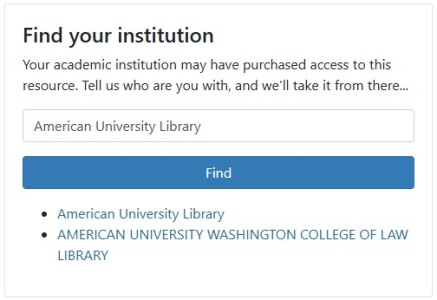
After clicking on the 'Access' hyperlink, you'll be taken to a new page. Again, if you are an AU student, faculty, or staff member, you can access restricted materials while away from the AU campus IP range. Using the 'Find Your Institution' input field on the page, type: 'American University Library,' click the button labeled 'Find,' and select 'American University Library' from the list that appears.
Step 3
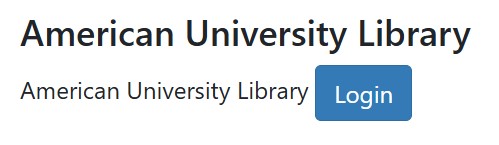
In the prompt on the top right of the same screen, you will see a blue Login button under the heading, 'American University Library.' Click Login to continue.
Step 4
Complete the prompt for the American University SSO using your AU credentials. Once you have logged in using your AU credentials, you will be directed to the resource.
Questions?
We're happy to help. Please get in touch with us using our contact form and provide as many details about your question as possible.
Step 1
When you try to select and view a restricted item you will see an alert with the message, "You may need to log in to continue. Access the full item and its details."
You will need to click the 'Access' hyperlink shown in the restricted materials message.
Step 2
After clicking on the 'Access' hyperlink, you'll be taken to a new page. Again, if you are an AU student, faculty, or staff member, you can access restricted materials while away from the AU campus IP range. Using the 'Find Your Institution' input field on the page, type: 'American University Library,' click the button labeled 'Find,' and select 'American University Library' from the list that appears.
Step 3
In the prompt on the top right of the same screen, you will see a blue Login button under the heading, 'American University Library.' Click Login to continue.
Step 4
Complete the prompt for the American University SSO using your AU credentials. Once you have logged in using your AU credentials, you will be directed to the resource.
Questions?
We're happy to help. Please get in touch with us using our contact form and provide as many details about your question as possible.